

Lead scoring
The criteria Kit scores people against for each product, how the three groups and their weights combine, red flags, the Hot to Low fit tiers, and previewing a change before you save it.
A fit score says how well a person matches what a product needs. Kit reads the person’s profile and conversations and checks them against the product’s criteria under AI Agent › Lead scoring. Each product has its own criteria; pick the product in the row at the top.
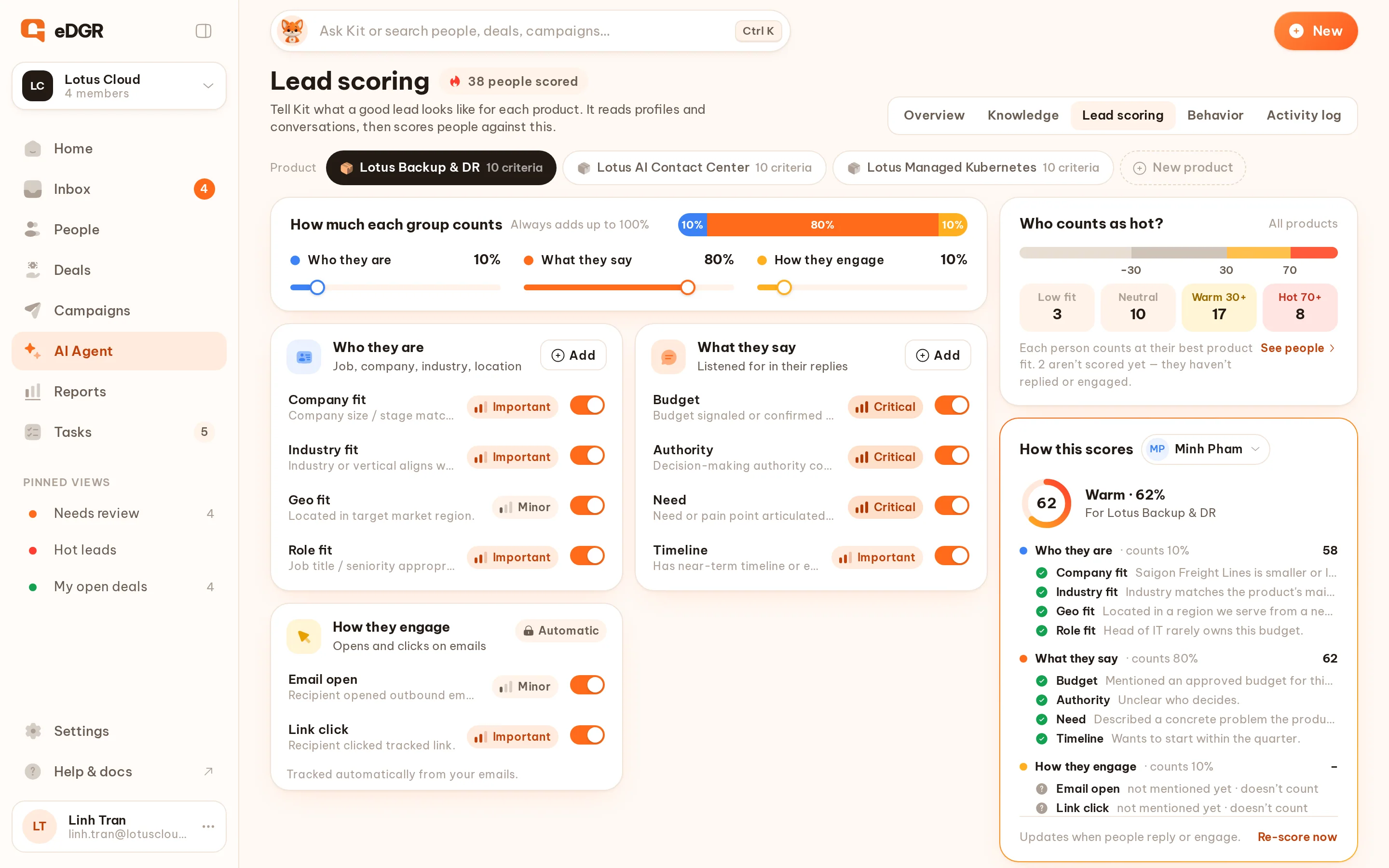
- 1 How much each group counts. The three always add up to 100%.
- 2 A criterion: its name, what Kit looks for, and how much it matters.
- 3 The switch turns a criterion off without deleting it.
- 4 How they engage is filled in automatically from email opens and clicks.
- 5 Who counts as hot: the tiers and how many people are in each.
- 6 How this scores: one person's score, and what it would be with your changes.
The three groups
| Group | Kit looks at | Starts with |
|---|---|---|
| Who they are | Job, company, industry, location. | Company fit, Industry fit, Role fit (Important), Geo fit (Minor) |
| What they say | What the person says in their replies. | Budget, Authority, Need (Critical), Timeline (Important) |
| How they engage | Opens and clicks on your emails. | Email open (Minor), Link click (Important) |
Every new product starts with these. What they say starts with the four BANT questions: does the person have budget, the authority to buy, a need your product meets, and a timeline.
How they engage is marked Automatic. eDGR fills it from email tracking, so you cannot add or remove its criteria or rename them. You can still change their description and importance, or turn them off.
Weights between groups
How much each group counts sets each group’s share of the score. The shares always add up to 100%: dragging one slider shares out the rest between the other two in their current proportion. A new product starts at 10% Who they are, 80% What they say and 10% How they engage. A changed share shows what it was until you save.
Add or change a criterion
-
Open the editor
Choose Add on a group for a new criterion, or choose a criterion’s row to change it.
-
Say what to look for
Give it a short name, such as “Runs on AWS”, and in the box below describe what Kit should look or listen for.
-
Good sign or red flag
Under This is a…, the thumb marks a good sign, which raises the score when Kit finds it. Flag marks a red flag, such as “Locked into a competitor”, which lowers the score when Kit hears it. A red flag shows Lowers score in the list.
-
Pick how much it matters
Minor, Important or Critical. A Critical criterion weighs a little over three times as much as a Minor one.
-
Save
Done puts the change in the page. Nothing is saved yet: a bar at the bottom counts your unsaved changes. Choose Save changes, or Discard to drop them all.
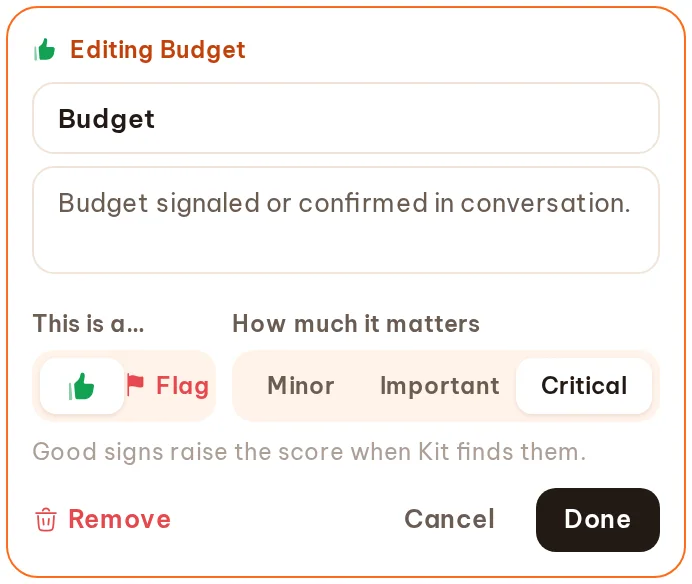
- 1 What Kit should look or listen for.
- 2 Flag makes it a red flag that lowers the score.
- 3 How much it matters.
- 4 Done puts the change in the page, to save with the others.
- Remove in the editor deletes a criterion. The switch on its row turns it off and keeps it; an off criterion shows · off and does not count.
- A saved change applies at once to the score shown on a person’s profile and in the Inbox, which is worked out each time it is shown. The Hot leads view, the tier counts and the fit filters in People use each person’s stored best score, which updates the next time that person is scored. A new criterion gets its first value at that next scoring too.
- With unsaved changes, switching product asks first, and so does reloading or closing the browser tab. Opening another page in eDGR does not ask, and the changes are lost.
How the score is worked out
Kit gives each criterion a value between strong yes and strong no, with a short reason. A criterion nobody has mentioned yet is left out of the average altogether.
- Each group’s score is the average of its assessed criteria, weighted by importance. A red flag that applies pulls the average down.
- The overall score is the average of the group scores, weighted by the group shares. A group with nothing assessed is left out.
- The score is published only when the groups with something assessed make up at least half of the total share. Until then the person is Not scored.
With the starting shares, an email open alone does not score a person, because How they engage holds 10% of the weight. A reply that tells Kit about budget or need does, because What they say holds 80%.
The score runs from −100% to 100%. A person can have a score for several products; lists show their best one.
Tiers
| Tier | Score |
|---|---|
| Hot | 70% and above |
| Warm | From 30% up to 70% |
| Neutral | Above −30% and below 30% |
| Low fit | −30% and below |
| Not scored | Too little known yet |
The tiers are the same for every product and cannot be changed. Who counts as hot? shows how many people are in each tier across all products, counting each person once at their best fit, and how many are not scored yet. See people opens Hot leads in People.
Preview a change
How this scores shows one person’s score for the product you have open. It starts on someone already scored, hot first; the person button picks someone else.
- Each group lists its criteria: a tick for one that raised the score, a cross for one that lowered it, and Kit’s reason. not mentioned yet · doesn’t count marks a criterion with no evidence yet, new · scored next time one you just added.
- With unsaved changes, the ring shows the score your changes would give and an arrow with the difference, and the line under it gives the current score. The preview reuses Kit’s existing assessments, so a new criterion counts only after the next scoring.
- Re-score now asks Kit to score this person again. It takes a moment.
When scores change
- During a conversation, as soon as a message tells Kit something about a criterion. Its steps show Updated fit score or Adjusted fit score.
- When the person opens or clicks one of your emails.
- When someone chooses Re-score now.
Where scores show
- In the Inbox, beside the person’s name and in the fit card of the person panel. See Reading a conversation.
- In People, in the fit column and the Hot leads view, and on the person’s profile, where Why 82% — Hot breaks the score down by group. See People.