AI Agent overview
What Kit does, whether it is on and ready, which channels it answers on, and the drafts and CRM changes waiting for you.
Kit is eDGR’s AI agent. It answers the messages people send you on email, LinkedIn and Telegram from your product knowledge, keeps their record in People up to date, and scores how well they fit what you sell. When it is not sure enough of a reply, it saves a draft for you instead of sending.
AI Agent in the sidebar is where you see and set all of this. Its pages:
| Page | What you do there |
|---|---|
| Overview | Check that Kit is on and ready, and see what waits for you. |
| Knowledge | Add products and the files and notes Kit answers from. |
| Lead scoring | Say what a good lead looks like for each product. |
| Behavior | Set how sure Kit must be to send on its own, add your own rules, and turn Kit off for people. |
| Activity log | Read every step Kit took. |
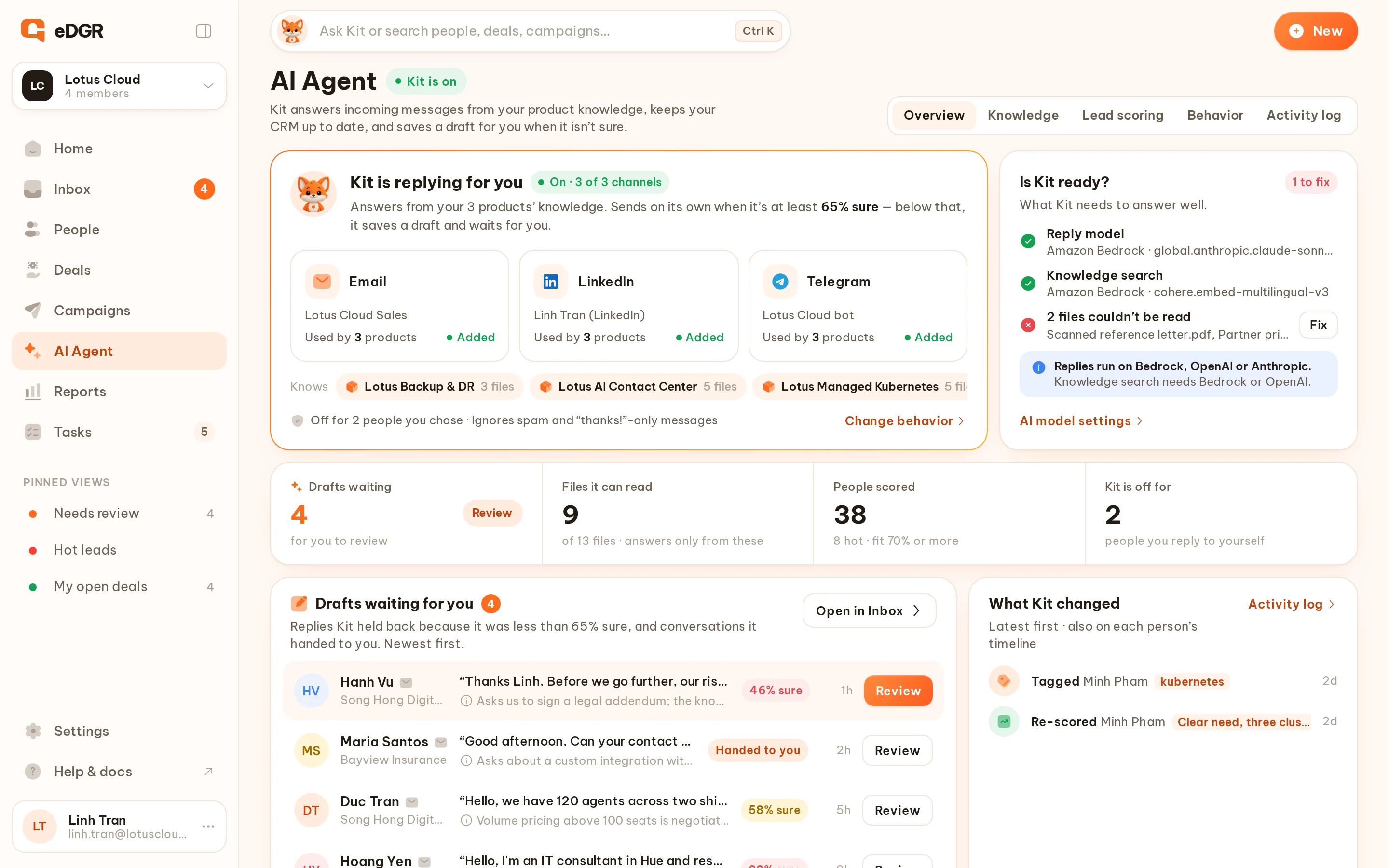
- 1 Whether Kit is on, and on how many of the three channels.
- 2 One card per channel account, or Connect for a channel with none.
- 3 The products Kit knows, with their file counts.
- 4 Is Kit ready?: the reply model, knowledge search and files.
- 5 The numbers: drafts waiting, files it can read, people scored, people Kit is off for.
- 6 Drafts waiting for you, newest first.
- 7 What Kit changed in your CRM lately.
Status
The header pill reads Kit is on when your workspace has a reply model and at least one channel account. Otherwise it reads Kit is off (no reply model) or Kit has no channel yet.
The status card says the same in a sentence and shows On · 2 of 3 channels, counting email, LinkedIn and Telegram. Below it:
- One card per channel account: its name, Added, and either Used by 2 products or Answers for all products. Linking an account to products limits what Kit answers about on it; see Products and channels. A channel with no account shows Not connected and Connect.
- Knows: the products Kit answers about, each with its number of files. Choose one to open its knowledge.
- The number of people you turned Kit off for, and Ignores spam and “thanks!”-only messages. Change behavior opens Behavior.
Added means the account was saved in your workspace. Nothing on this page tests that it can send.
Is Kit ready?
The checklist shows what Kit needs to answer well, with All set or the number of things to fix.
| Check | Fine when | Fix |
|---|---|---|
| Reply model | A model is chosen on Amazon Bedrock, OpenAI or Anthropic. | Fix opens Settings › AI model. |
| Knowledge search | A search model is chosen on Amazon Bedrock or OpenAI. Anthropic has no search models. | Fix opens Settings › AI model. |
| Files | Every file is read. | Fix on a file that could not be read opens its product. Add when there are no files. |
While files are being read the last row shows Reading 2 files, which usually takes about a minute. Files still not read after 10 minutes show as not read yet, usually because a model is missing. Choosing the models is described in AI models.
The numbers
| Number | Counts | Opens |
|---|---|---|
| Drafts waiting | Drafts and hand-offs waiting for review. | Inbox › Needs review |
| Files it can read | Files marked Ready, out of all files. Kit answers from these only. | Knowledge |
| People scored | People with a fit score, and how many of them are hot (70% or more). | People › Hot leads |
| Kit is off for | People you turned Kit off for. | Behavior |
Drafts waiting for you
The four newest drafts and hand-offs. Each row shows the person, their channel and company, the message Kit was answering, Kit’s reason, and either how sure Kit was or Handed to you. A score more than 10 points under your line shows in red. Review opens the thread in the Inbox, and Open in Inbox opens the whole queue. See Kit’s drafts and hand-offs.
What Kit changed
The six latest changes Kit made to people’s records, taken from its 60 latest steps: tags, fit scores, notes it remembered, follow-ups, deals, owners, audiences, profile fields, linked companies, channels it stopped contacting, and turning its own replies off or on. Searches and other look-ups are left out. Activity log lists everything; see Activity log.