

Campaigns
What a campaign is, how a run reaches people, and how to read the campaign list and its statuses.
A campaign is a flow of steps that reaches out for you after you launch it: send an email, wait for a reply, sort the reply, hand the person to an owner. Each launch is a run. A run takes the people in the campaign’s audience at that moment and starts the flow once for each of them, so every person moves through the steps on their own.
How a run works
- The audience is a snapshot. People added to the audience after launch don’t join the run; launch again to reach them.
- A campaign without an audience goes to everyone in People, including leads your teammates own. Review & launch asks you to confirm that before it lets you launch.
- A campaign must be linked to a product before its first launch. Kit writes and answers from that product’s documents and scores leads against it. Once linked, the product can’t be changed.
- One run at a time. While a run is going, Review & launch is locked until the run finishes or you stop it.
- Each person follows the flow as it was when they started. Changes you make in the builder during a run apply to the next run.
- Emails linked to a template use the template’s latest version when they send. See Templates.
The campaign list
Campaigns in the sidebar opens the list. Templates next to it switches to your saved messages.
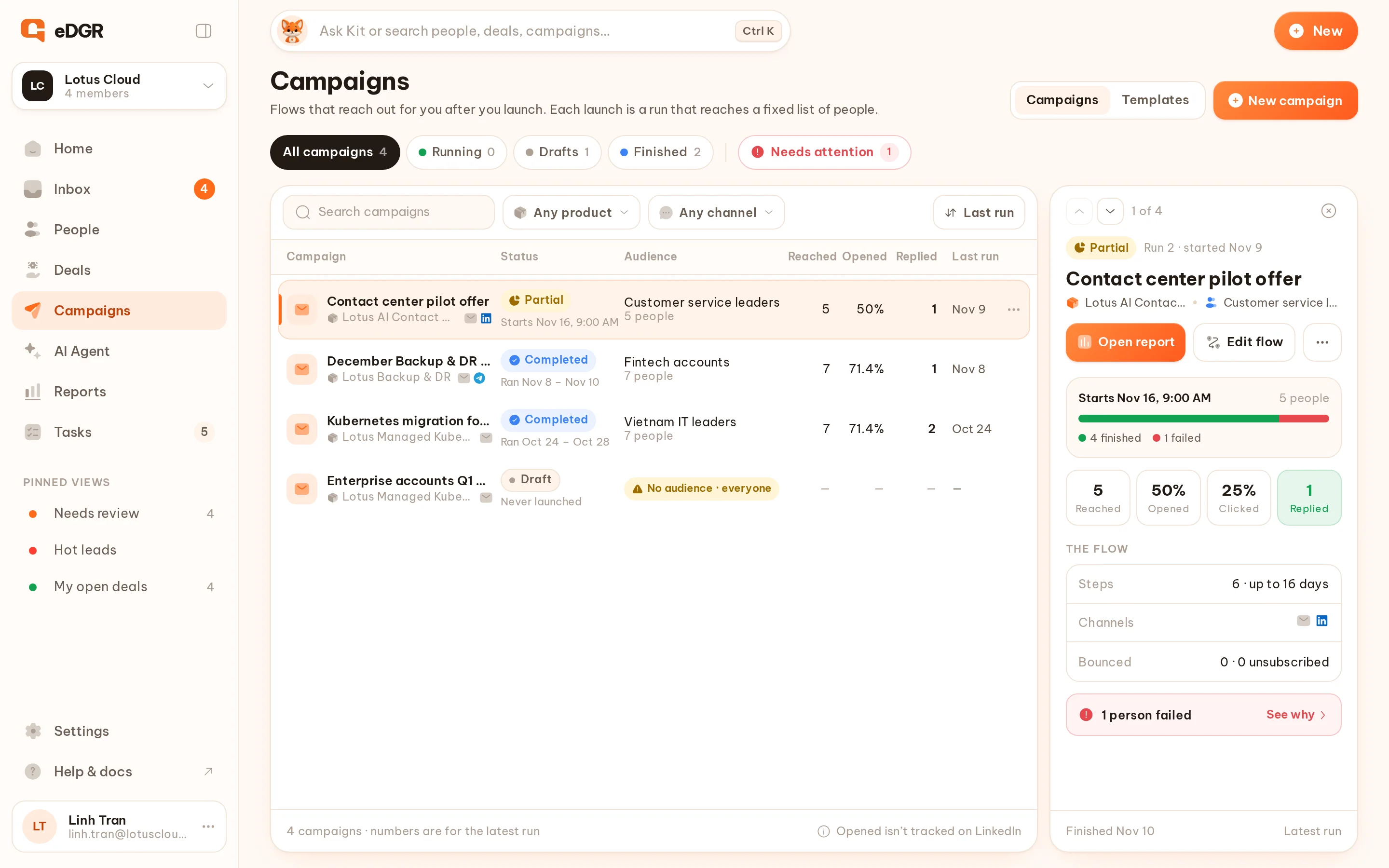
- 1 Views — All campaigns, Running, Drafts, Finished.
- 2 Needs attention — failed and partial runs.
- 3 Search by name or description.
- 4 Sort — Last run, Newest or Name.
- 5 Preview — the selected campaign.
- 6 New campaign.
Each row shows the campaign, its product and channels, its status, the audience and its size, and the latest run’s Reached, Opened, Replied and Last run. A row with no audience shows No audience · everyone in amber. Opens are tracked for email only, so Opened stays empty for a LinkedIn or Telegram campaign.
- Any product and Any channel narrow the list. Clear filters resets them.
- One click selects a row and opens its preview on the right: progress of the latest run, where people are waiting, and a See why link when people failed. A draft’s preview lists its steps, channels, audience and product, with Review to open Review & launch.
- A double-click, or Enter on a selected row, opens the builder for a draft and the report for anything that has run.
- The ⋯ menu on a row has Open report (not on a draft), Edit flow (Continue editing on a draft), Duplicate, Stop run while a run is going, and Delete.
Statuses
A campaign’s status is the status of its latest run.
| Status | Meaning |
|---|---|
| Draft | Never launched. |
| Running | The latest run still has people in the flow. |
| Completed | Everyone in the run finished. |
| Partial | The run ended with a mix of finished, failed and stopped people. A run you stop after some people finished or failed ends as Partial. |
| Failed | Every person in the run failed at a step. |
| Stopped | You stopped the run before anyone finished or failed. |
Under the status pill a short line says more: Day 2 of about 5 for a running campaign, how many people couldn’t finish, or Starts with a date when a launch is scheduled.
The Finished view holds Completed and Stopped campaigns. Needs attention holds Failed and Partial ones.