

Views and filters
What each Inbox view lists, how the channel filter and Unread only narrow it, and how to move through the list from the keyboard.
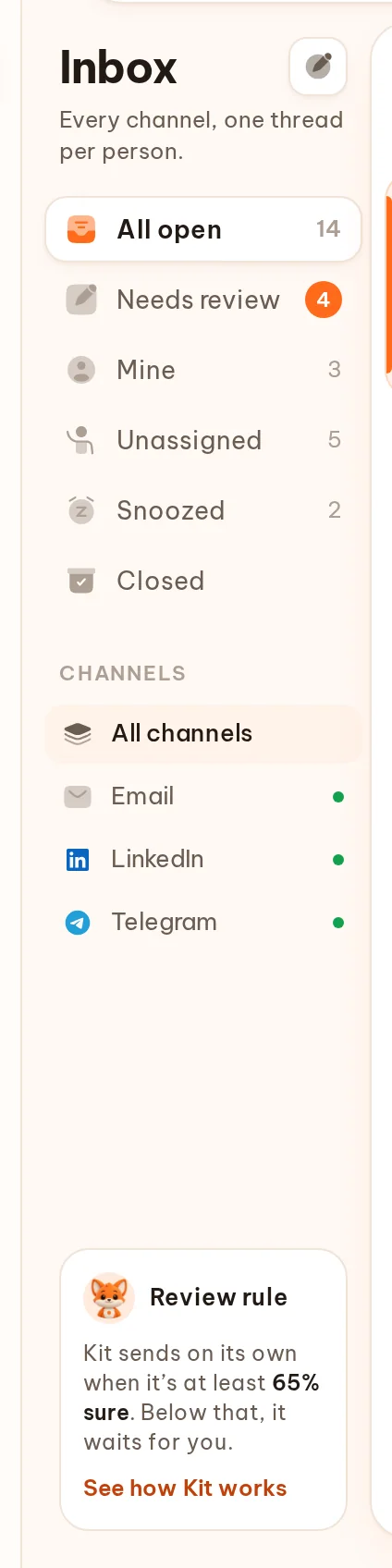
- 1 Needs review shows its count on an orange badge.
- 2 Mine and the other views show a plain count. Closed shows none.
- 3 Channel filter.
- 4 Review rule, with a link to AI Agent › Behavior.
Views
| View | Lists | Order |
|---|---|---|
| All open | Every thread that is neither snoozed nor closed. | Newest message first |
| Needs review | Threads with a draft from Kit or a hand-off waiting for you, whatever their status. A snoozed or closed thread with a waiting draft shows here too. | Oldest draft first |
| Mine | Open threads with people you own. | Newest message first |
| Unassigned | Open threads with people nobody owns yet. | Newest message first |
| Snoozed | Threads parked until a time, or until the person writes again. | Newest message first |
| Closed | Threads you closed. | Newest message first |
- The count beside a view is the number of threads in it for the channel you picked. Needs review counts people. The sidebar shows the Needs review count for all channels, beside Inbox and beside Needs review under pinned views.
- The view you pick is part of the address (
/inbox?view=needs-review), so a bookmark or a link from Home, Tasks or a deal opens the same view. - The list loads 50 threads at a time and loads more as you scroll down.
Channel filter
Under Channels, pick All channels, Email, LinkedIn or Telegram. The filter goes by the channel of the thread’s latest message, so a person who moved from LinkedIn to email shows under Email. A green dot beside a channel means your workspace has an account added on it. Resting the pointer on a channel shows Email account added or No Email account.
Unread only
The filter button above the list holds Unread only. A thread is unread when its latest message came from the person and nobody has opened the thread since. Opening a thread marks it read for the whole team, and does not change whether it is open, snoozed or closed.
With Unread only on, the count above the list shows how many unread threads are loaded, with a + when more may follow.
Handled by Kit today
At the foot of All open and Needs review, Handled by Kit today lists the people Kit answered on its own today and how long ago it replied. Replies Kit held back as drafts are left out. Choose a name to open that thread; Show all lists everyone after the first three.
Moving through the list
| Key | Does |
|---|---|
| J or ↓ | Opens the next thread in the list. |
| K or ↑ | Opens the previous thread. |
The keys do nothing while you are typing in a box. The conversation header shows your place, such as 3 of 18, with up and down arrows that do the same.
After you snooze or close a thread, the Inbox opens the next one in the list, since that thread usually leaves the view.
A link with ?thread= opens one thread directly. If the thread is not in the current view, the Inbox fetches it and opens it anyway.