

Campaign report
Read a campaign run's progress, where people are in the flow, the funnel, who failed and why, and what people clicked.
The report opens when you launch, when you open a campaign that has run from the list, and from View report in the builder’s ⋯ menu. It shows one run at a time, the latest unless you pick another in Run history. While the run is going, it refreshes every few seconds and shows Live.
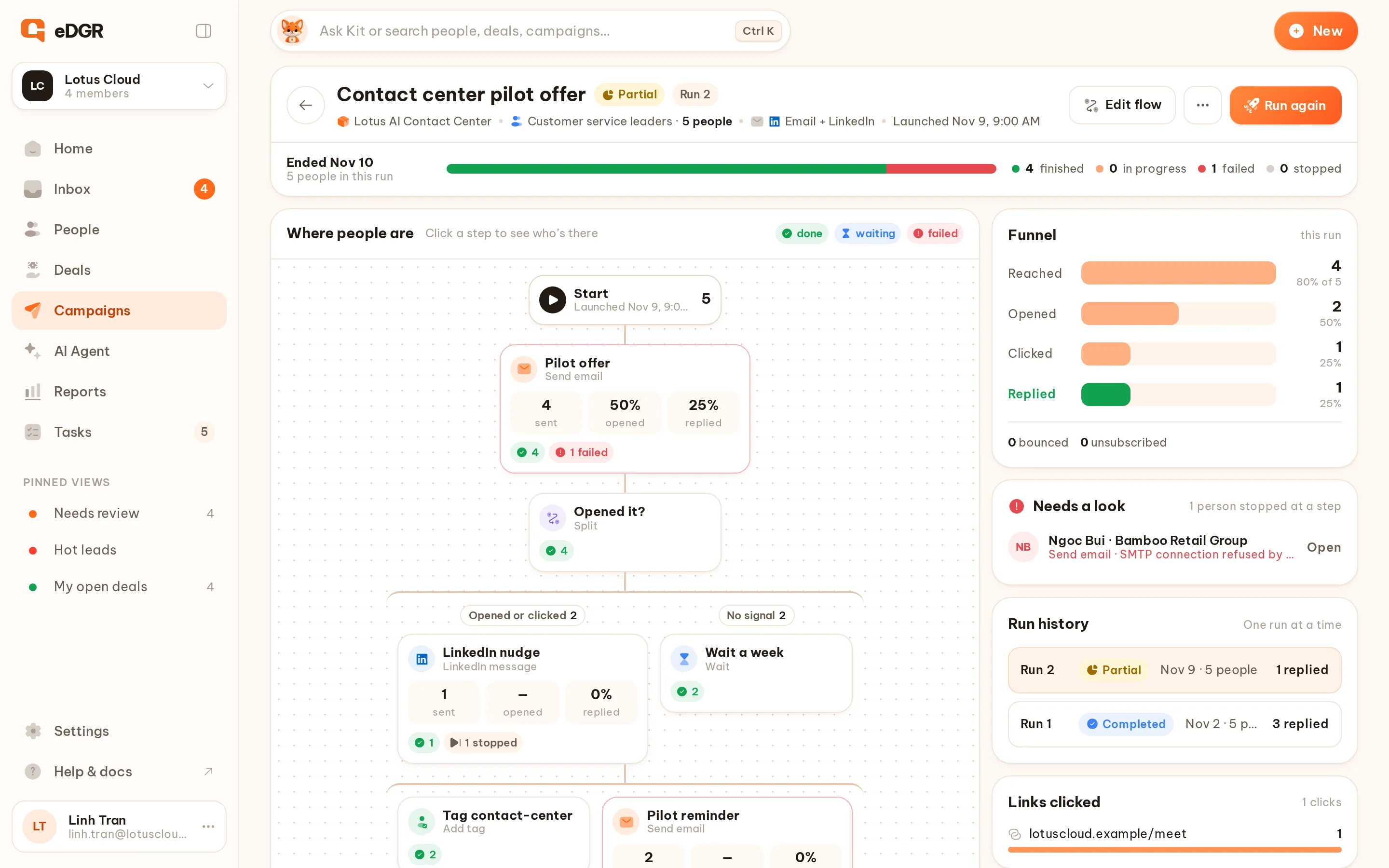
- 1 Campaign, status and run number.
- 2 Edit flow — opens the builder.
- 3 Stop run while running; Run again after.
- 4 Where people are — click a step to see who's there.
- 5 Funnel — this run's reach and replies.
Header and progress
The header shows the campaign name, the run’s status, Run N, the product, the audience and its size, the channels and when the run was launched. The buttons are Edit flow, the ⋯ menu, and Stop run while running or Run again once it has ended.
The bar under it splits the run’s people into finished, in progress, failed and stopped. On the left, a running campaign shows Day N of about M and how many people are still moving; an ended one shows the day it ended.
A campaign that hasn’t launched shows Not launched yet, with Review & launch and Edit flow.
Where people are
The flow map draws the campaign’s steps with the number of people done, waiting and failed at each. Clicking a step filters People in this run to the people at that step; the chip At “step name” clears the filter.
People in this run
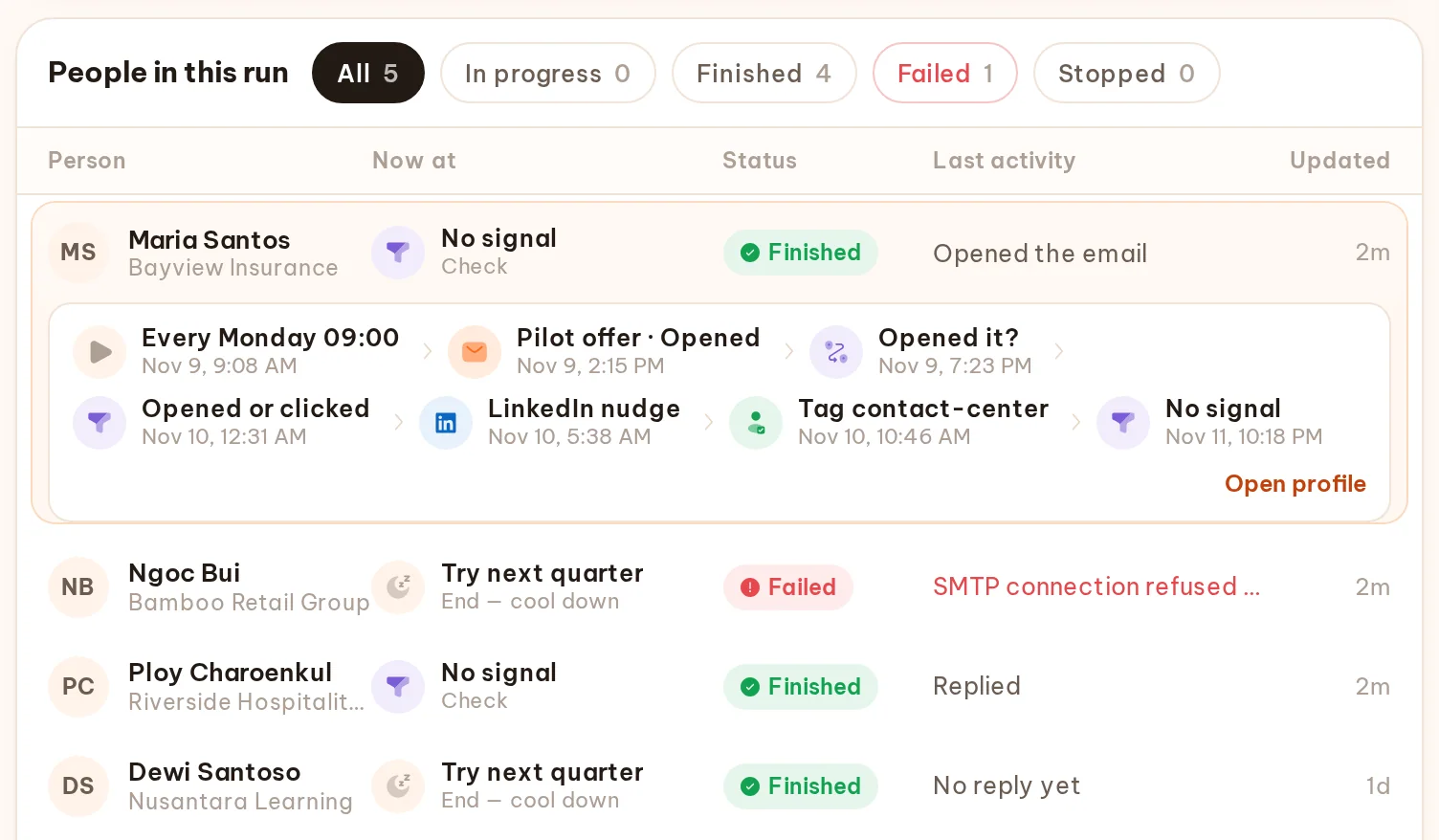
- 1 All — everyone in the run.
- 2 Failed — people a step couldn't handle.
- 3 Open profile — the person's page.
The chips All, In progress, Finished, Failed and Stopped filter the table. Each row shows the person, Now at (their current or last step), Status, Last activity (such as their reply’s first words, Clicked a link, Waiting at this step or a step’s error) and when it changed. Expanding a row shows every step the person passed, with Open profile.
A See why link in the campaign’s preview opens the report with Failed already picked.
Side cards
| Card | What it shows |
|---|---|
| Funnel | For this run: Reached (people a message was sent to, out of everyone in the run), Opened, Clicked and Replied, with percentages. Below: LinkedIn invites accepted, bounces and unsubscribes. |
| Needs a look | Up to four people who failed, with the step and its error, and Open. Shown only when someone failed. |
| Run history | The latest 20 runs. Click one to switch the report to it. |
| Links clicked | The five most-clicked links and how many clicks each got. |
| Devices | The devices people clicked from, with the top browser and system. |
| Countries | Where clicks came from: the top three countries and the rest as Other. |
- Opens and clicks are tracked for email only, and only when the step tracks them. A LinkedIn or Telegram campaign shows no open rate.
- Opens, clicks and replies in the funnel count each person once, and they keep counting after a step stops waiting.
- Links clicked, Devices, Countries and LinkedIn invites accepted count from the run’s launch until the next run starts.
- Bounces come from Amazon SES. A sender that uses a plain mail server reports none, and the card reads Bounces not reported.
For numbers across all campaigns, see Reports.