

Kit's drafts and hand-offs
Why Kit saves a draft or hands a conversation to you, how to send, edit or discard the draft, and how to turn Kit off for one person.
Kit answers each incoming message on its own, saves a draft for you, or hands the conversation to you without writing anything. A draft and a hand-off both put the thread in Needs review and create a task.
Why a draft exists
Kit rates how sure it is about every reply it writes, from 0 to 100%. Your workspace sets a line in AI Agent › Behavior, 60% unless someone changed it.
- At or above the line, Kit sends the reply.
- Below the line, Kit saves the reply as a draft.
- With Review every reply first turned on, every reply is saved as a draft.
- A safety check reads each reply before it goes out. A reply that could reveal Kit’s own instructions is saved as a draft whatever its score.
The Review rule card under the Inbox views states the current line.
Why a hand-off exists
A hand-off is a thread Kit passed to you without writing a reply. It happens when:
- the person asks to talk to someone on your team;
- the answer is not in your knowledge, or the question is outside your products;
- the person needs a price worked out (Kit quotes listed prices and does no arithmetic);
- the person opted out of your messages and then wrote again;
- something went wrong, such as an error or no answer from the AI model within 2 minutes.
Where drafts and hand-offs show
- Needs review, oldest first, and its count in the sidebar.
- A chip on the thread’s row: AI draft · 54% for a draft, Needs you for a hand-off.
- Drafts waiting on AI Agent › Overview.
- A task on the person, assigned to their owner. A person with no owner gets a task nobody is assigned to yet. The task is titled Review auto-reply (low confidence) for a draft and for most hand-offs, and Suppressed contact re-engaged when someone who opted out writes again.
Review a draft
The draft sits where the reply box usually is.
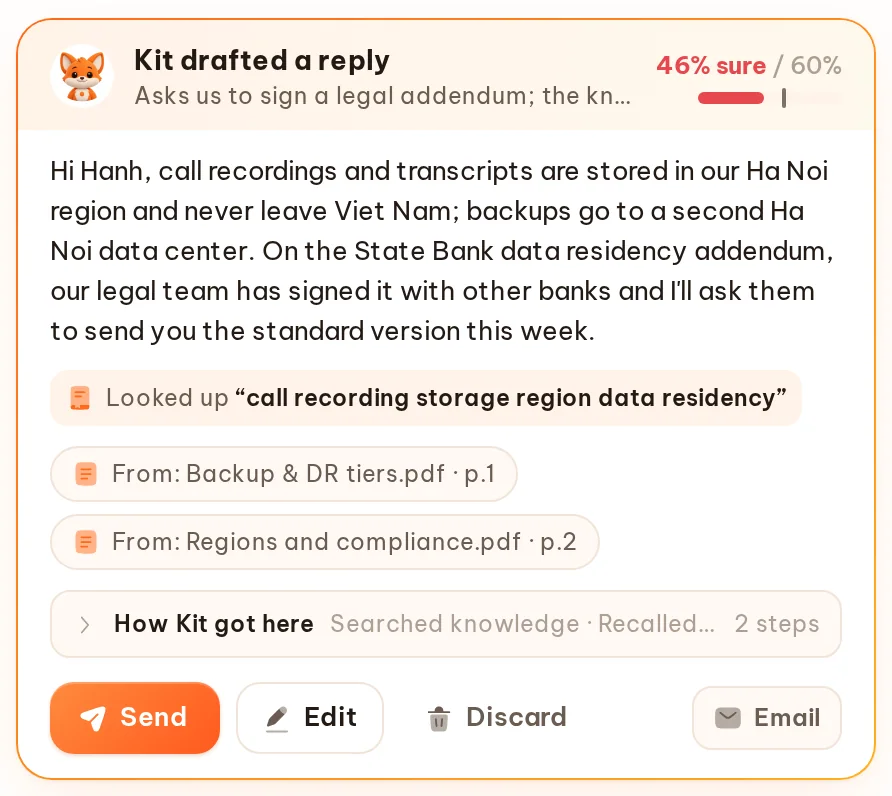
- 1 How sure Kit was.
- 2 How Kit got here: the steps of the turn that wrote it.
- 3 Send, from the account Kit was replying on.
- 4 Edit the text, or take off a document Kit attached.
- 5 Discard: nothing is sent.
- 6 The channel the reply goes out on.
The card shows:
- Kit drafted a reply, with Kit’s reason below it, or Waiting for you to review it when it gave none.
- A meter with how sure Kit was, such as
54% sure. - The drafted text.
- Looked up “…” chips with what Kit searched for in your knowledge, and chips for the documents it attached.
- From: … chips naming the passages the reply drew on.
- How Kit got here, the steps of the turn that wrote the draft. Choose it to list them.
Then choose one:
-
Send
Send sends the draft as it stands, from the account Kit was replying on. The draft leaves the card, the message shows in the thread, and the review task is marked done.
-
Edit, then send
Edit turns the text into a box. Change the words, or take off a document Kit attached with the × on its chip. Done closes the box; Ctrl Enter (⌘ Enter) sends straight from it. Adding a document is done from the reply box after you discard the draft.
-
Discard
Discard removes the draft and cancels the review task. Nothing is sent, and the reply box comes back for your own answer.
Answer a hand-off
A hand-off shows as Kit handed this to you above the reply box, with Kit’s reason. Write your reply in the box as usual. Dismiss takes the card away and cancels its task.
After a draft
- Kit stays on for the person. When they write again, Kit works on the new message as usual.
- If the person writes again while Kit is still writing, Kit does not send the reply it was working on. It reads the new message and writes the reply again.
- Kit also stays quiet, with no draft, on messages that need no answer: a pure “thanks” or “ok 👍”, and test or keyboard-mash messages such as “test test test”. An “ok” still gets a reply when the last message your side sent ended with a question.
Turn Kit off for one person
Kit replies in the conversation header is Kit’s switch for this person. Green means Kit answers them on its own. Grey means Kit stays quiet with them on every channel: it sends nothing, saves no draft and makes no hand-off, and you reply yourself.
-
Open the thread
Open any conversation with the person.
-
Switch it
Choose Kit replies. The switch turns grey and the Bot on chip leaves the thread’s row. Choose it again to give the person back to Kit.
- The same list is kept under AI Agent › Behavior › Kit is off for these people, where you can also add someone without opening their thread. The Hand to AI agent campaign step and Kit itself can switch it too; Kit’s change shows as Changed auto-reply in its steps.
- When the switch is on but your workspace has no reply model, the switch is on but not green, and Kit sends nothing until a model is chosen in Settings › AI model.