

Channels
Connect the email, LinkedIn, Telegram and Zalo accounts eDGR sends from and hears replies on, and keep them passing their checks.
A channel is an account eDGR uses to talk to people: a mailbox, a LinkedIn account, a Telegram bot or a Zalo Official Account. Any member can connect one. Campaign steps send from it, Kit replies through it, and messages people send to it land in Inbox.
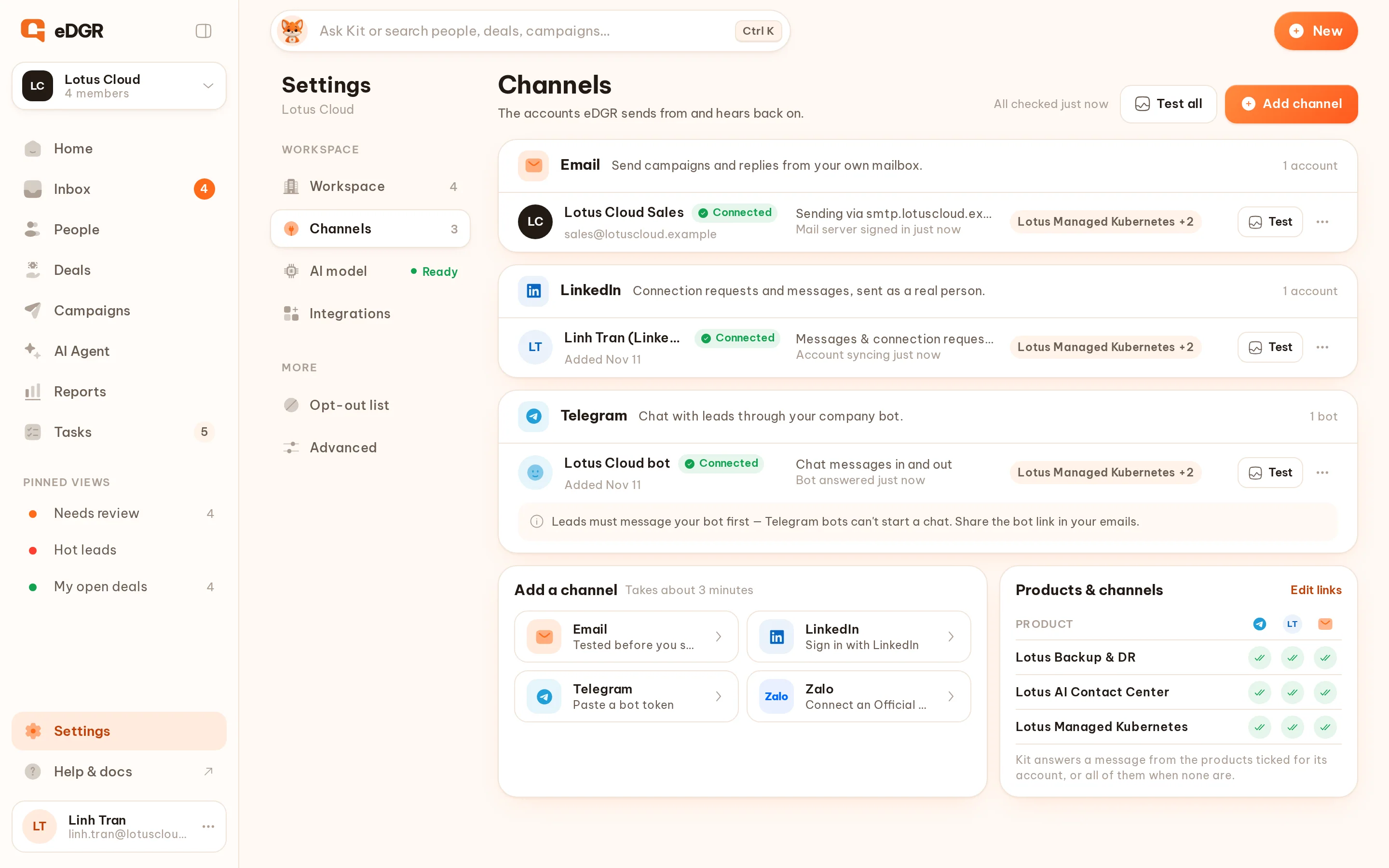
- 1 When the oldest check ran
- 2 Test all re-runs every check
- 3 Add channel
- 4 An account, its status and what its last check proved
- 5 Test, or Fix when the check failed
- 6 More: edit, rename, linked products, disconnect
- 7 Which products each account answers for
What each channel does
| Channel | Campaign steps | Replies in Inbox | What you connect |
|---|---|---|---|
| Yes | When reply reading (IMAP) is on | A mailbox’s SMTP server, optionally its IMAP server. See Email accounts | |
| Yes: messages and connection requests | Yes | A person’s LinkedIn account, through LinkedIn’s own sign-in page | |
| Telegram | Yes | Yes | A bot token from @BotFather |
| Zalo | No | Yes | A Zalo Official Account’s tokens and keys |
One account belongs to one workspace. Connecting a mailbox, bot or Official Account that another workspace already uses fails with a message that it is already connected, here or in another workspace.
Add a channel
Select Add channel, or pick a tile in the Add a channel card at the bottom of the page.
-
Open Connect LinkedIn
Pick LinkedIn. The drawer lists what eDGR does with the account: it sends connection requests and messages as this person, and brings their LinkedIn replies into Inbox. -
Sign in, or send the link
Sign in here opens LinkedIn’s sign-in in a new tab, for your own account. If the pop-up is blocked, allow pop-ups for eDGR and try again. For a colleague’s account, select Copy sign-in link and send it to them; the link works for about an hour.
-
Wait for the account
The drawer waits up to 3 minutes and shows LinkedIn connected when the account arrives. Coming back from LinkedIn’s page, the Channels page may show a note that LinkedIn is connected and may take a moment to appear.
LinkedIn has no settings to edit. When its check fails, Sign in again in the row’s menu signs the same account in again, and the campaign steps that use it keep working.
-
Create the bot
In Telegram, message @BotFather, send/newbotand copy the token it sends back. -
Paste the token
Pick Telegram, give the bot a Bot name in eDGR and paste the Bot token. -
Test and connect
Select Test the bot. eDGR asks Telegram whether the token works. Then Connect bot.
A Telegram bot cannot start a chat. People must message the bot first, so share the bot’s link in your emails.
-
Collect the keys
From your Zalo app and Official Account: the OA access token, the Refresh token, the App ID, the App secret key and the OA secret key from the app’s Webhook page. -
Paste them
Pick Zalo. The access token expires within a day; with the refresh token and app secret key, eDGR renews it and saves the new one. Without the OA secret key, eDGR refuses incoming messages because it cannot check their signature. -
Set the webhook
Copy the URL under Webhook into your Zalo app’s Webhook settings and turn on the “user sends message” events. -
Test and connect
Select Test the account, then Connect account.
Zalo lets an Official Account reply only to people who messaged it in the last 7 days, and eDGR cannot send attachments on Zalo yet.
The email, Telegram and Zalo drawers end with an optional product list, as described under Products and channels. A LinkedIn account gets its products afterwards, from Linked products in the row menu.
Health checks
Each account gets a real check: email signs in to the mail server (and to IMAP when reply reading is on), LinkedIn asks whether the account is still syncing, Telegram and Zalo ask their API whether the bot or Official Account answers. eDGR keeps the last result. Opening the page re-runs any check older than 5 minutes.
| Status | Means |
|---|---|
| Connected | The last check passed. The row says what it proved, such as “Mail server signed in 4 min ago” |
| Needs attention | The last check failed. The row shows the provider’s error |
| Checking | A check is running, or the account has none yet |
When an account fails, a banner at the top names it and how many more failed: campaign steps and replies that use it may fail until it is fixed. For email, Telegram and Zalo the banner offers Fix settings, which opens the account’s drawer. For LinkedIn it offers Sign in here and Copy sign-in link, for whoever owns the account. The Channels item in the Settings list shows an amber count of failing accounts.
The row menu
| Item | What it does |
|---|---|
| Test again | Shown when the check failed |
| Edit mail server / Edit bot token | Opens the account’s drawer. Not on LinkedIn |
| Send me a test email | Email only. Sends “Test email from eDGR” to your own address |
| Sign in again | LinkedIn only |
| Rename | Changes how the account shows in eDGR. Nothing else changes |
| Linked products | Which products the account answers for |
| Disconnect… | Removes the account after a confirmation |
Disconnecting stops sending from the account and stops hearing replies on it. Campaign steps that use it fail until you pick another account in the step.
Products and channels
The Products & channels card is a grid of products against accounts. A tick means the account answers for that product. Edit links opens the same grid to change, then Save links.
- A message that comes in on an account is answered from the ticked products’ files. With nothing ticked, the row says All products and Kit answers from every product’s files.
- When Kit sends its own email about a product, it uses that product’s email account.
- Campaign steps keep the sender picked in the step.
Automatic replies
There is no per-channel switch for Kit. Kit replies on every connected channel once a writing model is set on AI model. To keep Kit quiet with one person, turn off Kit replies on their conversation in Inbox. An address on the Opt-out list gets no replies at all.